
DataRoad · IT Services and Consultancy
Hotels and Tourism
Wi-Fi that holds up
A full hotel puts hundreds of devices on the same network at the same time.
Wi-Fi networks sized for real occupancy, guest network separated from management, PMS running and work done outside check-in hours.
Talk to us
Guest network separated from managementRead More ...Networks and CablingStructured cabling and access points
Certified installation with a guaranteeRead More ...

DataRoad supports hotel IT throughout the national territory


Sized for guests and concurrent operation, not on paper.
Management network separated from the guests'.
Off-peak interventions.
Hospitality sector
IT for Hospitality: Wi-Fi, Networks and Video Surveillance
In a hotel, IT is part of the guest experience. Wi-Fi that fails in the room ends up in the online review the following day; a PMS — the system that manages reservations and billing — being down halts check-in during peak hours; a camera that failed to record turns a minor incident into a serious problem. DataRoad installs and maintains the technological infrastructure of hotel units in Lisbon and across the country.
Why can’t the hotel industry be run like an office?
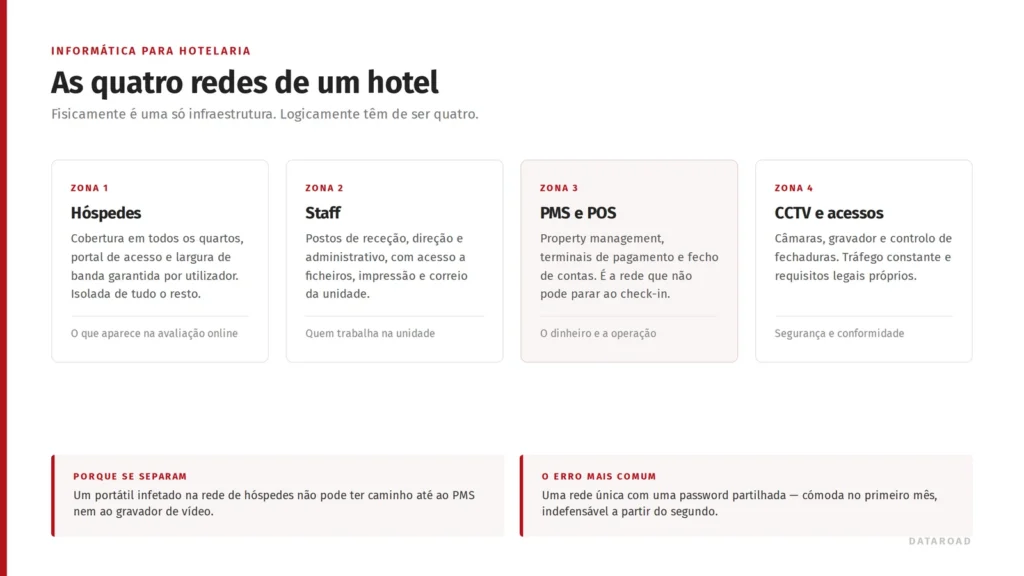
An office has one type of user, fixed opening hours and a single network. A hotel has guests who change every day, staff working in shifts, billing systems that cannot be shut down and cameras recording non-stop — all within the same building and often using the same cabling.
Walls that are no help
Historic buildings, thick walls and uneven floors disrupt the wireless signal. The solution is to carry out on-site measurements and install access points in each room or zone — rather than simply installing one access point per floor and hoping for the best.
Guests and operations do not mix
The guest network is public by nature. The PMS, payment terminals and accounting system cannot share the same logical space.
There is no convenient time
There’s no such thing as a free Saturday night in a hotel. Work is carried out in stages, with a fallback plan, and without disrupting guests who are checking in.
It’s the work that counts
In refurbishment projects, the cabling must be planned before the walls are closed up. After that, each missing network point costs ten times as much.
What we do in a hotel
| Area | This includes |
|---|---|
| Wiring and frames | Design and installation of structured cabling certified, Rack and distribution by floor. |
| Wireless | Wi-Fi 6 and Wi-Fi 7 with access points by room or by zone, a visitor portal and centralised management. |
| Network security | Firewall and VLAN segmentation (separate networks within the same infrastructure) between guests, staff and critical systems. |
| CCTV | CCTV with continuous recording, controlled remote access and signage in accordance with the law. |
| Ongoing support | IT Unlimited - user support and fixed-cost maintenance, with rapid incident response. |
Density, not coverage
The usual question is, “Does the signal reach room 214?”. The right question is, “How many devices will be connected on that floor at 10 pm?” A 60-room hotel easily has 200 devices connected at the same time — mobile phones, laptops, televisions and tablets.
Sizing based on coverage results in a nice-looking map but dissatisfied guests. Sizing based on density requires more access points but solves the problem once and for all.
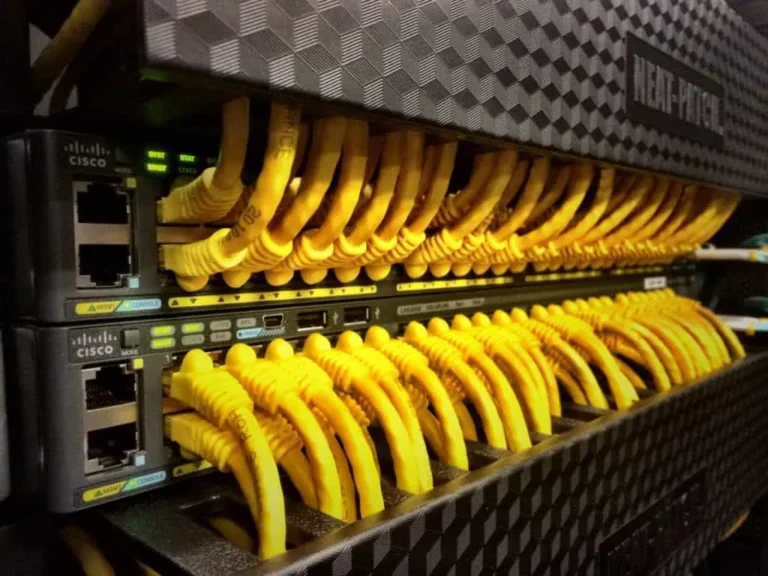
Structured cabling in hotels: what goes inside the walls
In a hotel, cabling is the only part of the infrastructure that is not replaced later. Access points can be replaced in a morning, a switch can be swapped out in an afternoon—but the cable running inside the bedroom wall stays there for twenty years. That is why the cabling decision is the most expensive one to get wrong and the cheapest one to get right.
One network point per room is not enough
The account that usually fails is this one: a modern hotel needs a network connection for the corridor access point, the bedroom television, the electronic door lock, the thermostat and the telephone. When cabling is done with only Wi-Fi in mind, two years later ceilings are ripped open again to run what was missed.
- Rooms — outlets for TV, IP telephone and home automation, as well as the corridor access point.
- Common areas - lobby, restaurant, terrace and meeting rooms, with density calculated by occupancy rather than square metres.
- Back-office - reception, housekeeping, stores and the back-of-house where it all ends.
- Security — cameras and access control on the same infrastructure, on a separate VLAN.
When CAT6A is justified, and speed isn't the reason
We installed CAT6 and CAT6A structured cabling. In the hotel industry, choosing CAT6A — the cable category above CAT6 — is rarely about the 10 Gbps: it is about PoE, the electrical power that runs through the network cable itself. Wi-Fi 7 access points and modern cameras draw power via the cable, and CAT6A dissipates heat better in a bundle of dozens of cables inside the same cable tray.
A hot cable loses throughput before throwing an error: the type of fault no-one diagnoses and everyone feels. If you're deciding the category, we're writing a Guide to CAT5e, CAT6 and CAT6A.
Building work with a full hotel
We rarely wire an empty hotel. We work floor by floor and wing by wing, with the cable runs prepared during off-peak hours so that no room is out of service for more than a single morning. Reception and the PMS never stop — they are the first to be migrated and the last to be touched.
Certification is what separates a work from a promise
Every installed point is certified using Fluke equipment and handed over with a point-to-point report. Without certification, a network problem the following year is an argument without a referee: it could be the cable, it could be the switch, it could be the access point. With the report in hand, you know for sure. We explained why at why certifying the network is not optional.
Hotel cabling projects
- LX Arch Hotel, Rua Augusta - full installation, Wi-Fi 7, CCTV and IT management.
- Nicola Rossio Hotel — network, Wi-Fi, firewall and IT Unlimited.
- Hotel Wi-Fi — the network that guests praise and the one that manages the hotel.
Wireless networks in hotels: the evaluation starts with the guestroom Wi-Fi
Access point per room or per corridor — and why it is not the same calculation
The choice between putting an access point inside every bedroom or serving multiple bedrooms from the corridor is not a matter of budget: it is a matter of construction. Concrete walls, metal doors and bathrooms in the path of the signal decide for you.
We measure on site before deciding, and then we cable accordingly — because changing your mind after the walls are closed costs another build. We install enterprise wireless networks with PoE-powered access points from the floor cabinet, managed centrally.
Suites, event rooms and terraces call for different things
An event room with two hundred people connected at the same time is a density problem that no corridor coverage can solve. A terrace is an outdoor problem, with equipment specifically designed for that.
A suites floor is a roaming issue so that the guest's call doesn't drop between the room and the lift. We size each zone by the number of anticipated devices, and the generation of Wi-Fi to use get out of this account, not the catalogue.
The guest network cannot see the operation
Every day, dozens of devices enter the hotel that nobody controls. The guest network must be isolated from the PMS, the point of sale (POS) terminals, video surveillance, and staff equipment — and guests must be isolated from one another within the guest network itself. We configure the access portal, usage limits per session, and monitoring that shows, before a complaint reaches reception, that a floor is without coverage.
Wireless network projects in the hospitality industry
No LX Arch Hotel, on Rua Augusta, guest Wi-Fi 7 was included in the same project as the structured network and the firewall, ready on opening day. Ouro Rossio Hotel We installed 30 Wi-Fi access points alongside the 55 cameras and the firewall. We also wrote about Wi-Fi for hotels and the separation of guest and operational networks and about wireless networks for hotels in Lisbon.
CCTV in hotels: the footage the morning after demands
A hotel is a building through which dozens of people pass every day whom no one knows, with access to corridors, lifts, parking and communal areas at any time.
When something goes wrong — missing luggage, damage to a room, an argument outside a bar, a bump in the park — the difference between resolving the matter in ten minutes and dragging it out for weeks depends on whether or not there is usable footage of the right moment. That is why we install professional CCTV at the same time we installed the network: the cameras depend on it.
Start with the objective, not the number of cameras
To deter someone, identify someone, verify a process or constitute evidence are different objectives and result in different projects. A panoramic camera that covers the entire lobby is useful for knowing that there was movement; it is not useful for saying who it was.
In a hotel unit, the points that almost always require identification are the main entrance, reception, floor access points and the car park exit — and it is these that need facial-level framing, paying attention to the backlight of glass facades. The rest of the building is taken care of with transitional coverage. Two well-aimed cameras at the entrances are worth more than ten filming empty space.
Where the law says no
Hotel CCTV monitoring involves the processing of personal data, and there are lines that must not be crossed: guest rooms, bathrooms, changing rooms, and staff rest areas are excluded, and the recording must not extend to public thoroughfares.
Add visible signage before each monitored area, a defined and effectively implemented retention period, a log of who viewed which images and the proper information given to employees — the purpose cannot be to monitor the performance of those who work there. We handle this at the design stage and deliver the compliance dossier with the system, not after someone complains.
The cameras live on the hotel network
An IP camera is a computer connected to your network and powered by the cable itself. From this, two decisions are made while still in the phase of structured cablingthe switches must have a PoE power budget for all cameras — adding cameras to a switch without headroom causes random reboots that no one can diagnose later — and the CCTV has to be on separate network of the guests, the PMS and the POS.
Video traffic is continuous and heavy, and video surveillance equipment has historically been among the least updated. On a flat network, a compromised camera is an open door to the billing system.
How many days do you need to be able to go back
The question that sizes the recorder is not how many cameras it has: it is how many days you need to be able to go back. That answer, multiplied by the number of cameras and the image quality, gives the necessary storage — and this is where most systems fall short, deleting precisely the period you were interested in.
We install NVR recorders with encrypted storage, configured retention and backup of critical footage, with remote access on mobile and computer via user profiles: management does not see the same as reception, and a log is kept of who viewed what.
CCTV projects in the hospitality sector
No Hotel Ouro Rossio, in Lisbon, we installed 55 cameras with continuous recording alongside 30 Wi-Fi access points and a firewall, covering entrances, corridors, reception, parking and outdoor areas. In LX Arch Hotel, on Rua Augusta, video surveillance was integrated into the same project as the structured cabling, guest Wi-Fi 7 and the firewall, all operating on opening day and under continuous management ever since.
If you want to understand the decisions before requesting a quote, our guide on IP video surveillance project for businesses explain what determines whether the images will be of any use.
How we work in a live environment
On-site survey
Measuring the actual floor-by-floor coverage, carrying out an inventory of existing assets and reviewing the floor plan with management.
Design and phasing
Floor plans organised by wings or storeys, with windows designed to suit the building’s function and a setback plan for each phase.
Execution
Wiring, racks, equipment and configuration. Certification of each socket with a report provided.
Operation
Continuous monitoring, user support and coverage review whenever the unit changes configuration.
Real-life cases
Complete IT installation: cabling, Wi-Fi 7, CCTV and ongoing IT management in the historic centre.
Comprehensive IT infrastructure, wireless internet access for guests and a CCTV system.
Indoor and outdoor wireless network for guests and structured IT cabling.
View all DataRoad projects and news
Frequently Asked Questions
Do you need one access point per room?
Not always. In modern buildings with lightweight walls, a single access point can serve two to three rooms. In older buildings with thick walls, one access point per room is often the only solution that works. Only an on-site survey will provide the answer.
Can we keep our PMS?
Yes. We do not sell or replace hotel management software. We manage the network, security and availability on which it relies.
How long does it take to install the system in an operational facility?
It depends on the number of rooms and the condition of the existing wiring. We work in stages — usually wing by wing — so that the entire building is never affected at the same time.
Does video surveillance comply with the law?
As for the technical aspects, yes: reliable recording, configurable retention periods and logged access. The unit is obliged to provide information on and keep a record of data processing, and we provide support with the technical aspects of both.
A chat before making a decision
Whether you’re tackling a specific problem, planning a move or simply looking for a second opinion, we always start in the same way: by understanding your situation before making any suggestions. No obligation, no jargon and no catalogues.
Other sectors we monitor
- Clinical and Healthcare IT
- IT for Offices and Multinationals
- IT for the Public Sector
- IT for Embassies and International Organisations
- Computing for Schools, Colleges and Universities
Further reading
Enterprise Wireless Networks: Why Home Wi-Fi Just Won't Do
Enterprise wireless networks: the four problems that cause Wi-Fi failures, why more access points make the network worse, the role of the site survey…
Hotel IT: Wi-Fi, PMS and Networks That Cannot Fail
IT infrastructure in hospitality: why Wi-Fi is a product and not infrastructure, the mandatory separation between guest and staff networks…
DataRoad blog articles and news
- UpHill: new network, Wi-Fi, biometrics and IT Unlimited support
- 10 Signs That Your Company’s Wi-Fi Network Needs Upgrading
- The 7 Most Common Mistakes When Installing Business Wi-Fi
- Setting Up an Office in Portugal: The IT and Wi-Fi Guide for Foreign Companies
- Hotel IT: Wi-Fi, PMS and Networks That Cannot Fail
- Sten: expansion of the wireless and IT network in Portugal