DataRoad · IT Services and Consultancy
Support tickets
Nothing is lost
Email requests and hallway conversations are where problems get lost.
Every request is a ticket with an assignee, a deadline and a history — to see what was asked, what was done and how long it took.
Raise a ticket
Managed support · Ticketing system
Business IT Support: from Request to Resolution, with Guaranteed Response Times
At DataRoad, no request gets lost in an email or a forgotten call. All requests go into a ticket system, are classified by priority and handled by a certified team — with a average response time of less than 2 hours and the entire documented history.
Why a ticketing system matters
Without a ticketing system, IT support relies on random emails and phone calls: requests get lost, nobody knows what is pending and yesterday's problem only reappears when it has already brought the business to a halt. It is the difference between promise support and be able to prove it.
With DataRoad's ticketing system, every request has one number, one person responsible and one deadline. It is classified by priority, it is measured against Written SLA and it is recorded in your company's history — so any technician has the context without asking you the same questions twice.
Three ways to open a request
Client portal
Raise requests in seconds, track their status in real time and view your company's entire history in the DataRoad client portal — available 24/7.
An email to our helpdesk automatically creates a ticket with its number. You receive instant confirmation and updates continue in the same thread.
Telephone
For emergencies, call +351 211 459 950 (weekdays, 09:30–18:30, Lisbon time). The request is logged as a ticket anyway — nothing is left out of the system.
The lifecycle of a ticket, step by step
Opening
The request comes in via the portal, email or phone — or is created automatically by our monitoring, before you notice the problem.
Classification
A technician analyses the case, confirms the business impact and gathers the context: affected users, equipment, history.
Priority and allocation
The ticket is given a priority (P1 to P4) with a response time defined by SLA and is assigned to the appropriate specialist.
Diagnosis and troubleshooting
Most cases are resolved remotely on the first contact; when necessary, we visit your premises.
Checking with you
The ticket only moves to closed when the user confirms that everything is working — we don't close them by decree.
Close and check-in
The resolution is documented in your company's knowledge base. Recurring issues generate preventive actions.
Priorities and first response times
| Priority | Example | First response |
|---|---|---|
| P1 · Review | Business standstill: server, network or essential service down | < 1 hour |
| P2 · Alta | User or equipment stationary, active safety risk | < 2 hours |
| P3 · Media | Fault or error without stopping operation | < 4 hours |
| P4 · Low | Requests, changes and planned improvements | < 8 working hours |
These times are not an intention: they are defined in writing in our service level agreements (SLAs) and they are measured in periodic reports. In practice, the actual average is usually better — under 2 hours across all requests.
And out of hours?
The standard support hours are from Monday to Friday, 09:30 to 18:30 (Lisbon time). Outside these hours, the 24/7 monitoring continues to monitor its systems and generate automatic alerts. For businesses that cannot stop operating — clinics, logistics firms, international operations — the plan IT Unlimited Premium 365 Includes out-of-hours support.
Proactive support: the tickets we open before you do
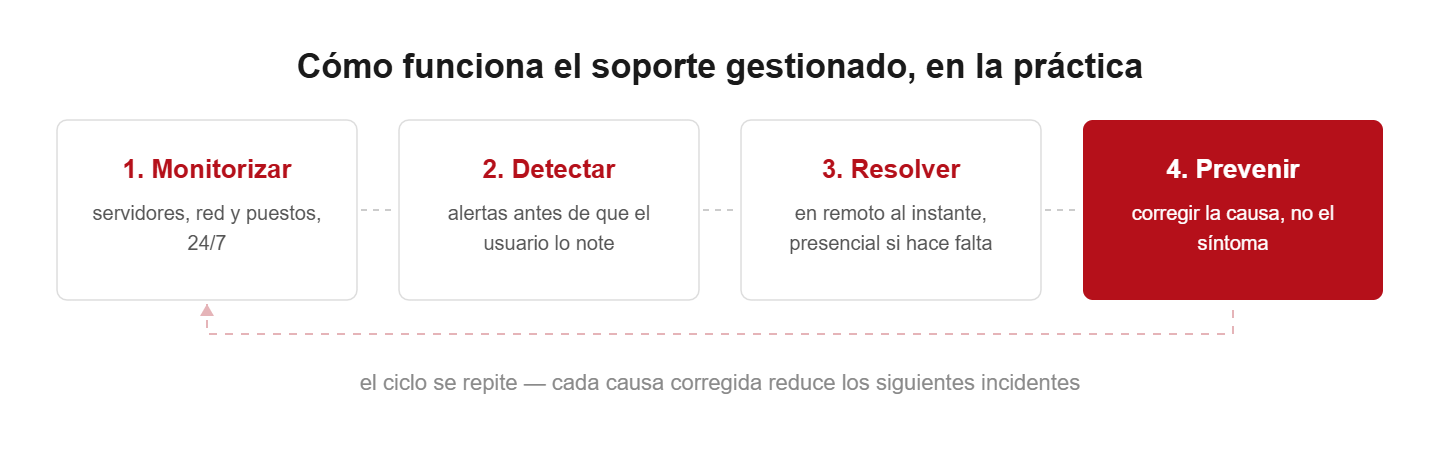
A significant portion of DataRoad tickets are not opened by clients — they are opened by our 24/7 monitoring systems. Discs filling up, failed backups, certificates about to expire: alerts automatically create tickets and the team takes action before the problem affects anyone. That is the difference between reactive and support managed IT.
Major incidents: escalation and communication
When an incident has a wide impact, the process escalates: a dedicated manager takes on coordination, you receive regular situation reports until resolution and, at the end, a post-incident report with causes and preventative measures. No silences or “we are looking into it”.
- written and measured SLAs - contractual response times, not verbal promises.
- Periodic reports — open and closed tickets, response times and trends.
- Full history — your company’s entire IT history, documented and accessible.
- No contract — Trust is renewed every month, with results.
Frequently asked questions
How do I open a support ticket?
Via the client portal (24/7), by email to the helpdesk or by phone (+351 211 459 950, working days 9:30–18:30). On any channel, the request receives a number and a response timeframe.
What is the difference between response time and resolution time?
A ‘response’ is when a technician takes on the ticket and starts working — that is what the SLAs guarantee. Resolution depends on the complexity, but most cases are resolved remotely during the first intervention.
What happens outside of support hours?
24/7 monitoring remains always active and automatically logs alerts. Companies with the IT Unlimited Premium 365 plan have out-of-hours support.
Can I track the status of my applications?
Yes. On the client portal you can see open tickets, the status of each one and your company's entire history — without having to call and ask.
Do I need a contract to use support?
The SLAs and the portal are part of the IT Unlimited plans, starting from €21 per user per month. For one-off needs, there is IT support on demand.
Would you like support with guaranteed response times —
and proof that they are met?
Get in touch with us: we’ll show you the portal, the SLAs and the reports received by our more than 232 clients.
Request a quote for managed supportSome of the companies that entrust their infrastructure to DataRoad, sectors where downtime costs far more than IT support